Showing posts with label gamedev. Show all posts

This is how conquests will work in My Own Civilization


You won't need to handle hordes of units one-by-one. Just draw your strategic orders on the map - and your people will start working to perform them. Join the facebook group to learn more of the development

Strategy interface video of Civilizations Builder

Thank you very much for playtesting the initial version of "Civilizations Builder". Got multiple useful suggestions from you, working hard to implement them. And now I'm ready to show the current strategic interface.


Unlike Sid Meyer's Civilization (which, I think, is an ingenious game, but needs some adjustments), you won't need to build a scout, then move the scout to one cell, then to another. Instead you'll need just to set up a strategic task "sentry", and your people will do the rest.

The same works for all the other aspects: colonization, revolution, terrain improvement, wars.
Join the Facebook group!

Civilizations Builder - first testing

We proudly present the first playable version of our own mobile turn-based strategy.

Civilizations Builder

Download from Google Play
Download .apk file directly
Web version (For Flash Player 23+)
Desktop version (for Windows)
Facebook group
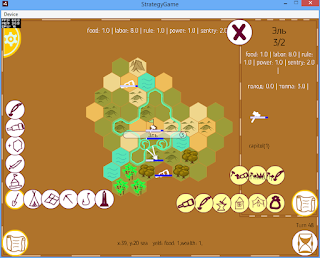

As this is the first version, without a proper tutorial, please, read this manual carefully.

First you should develop your territory. Press the bottom-left button (with a scroll) and then the 2nd bottom button (with a shovel).

You can build:

- hunters camp (+ 1 to food, +1 to sentry)
- field (+1 to food)
- mine (+1 to labor)
- fishermen willage (+1 to food)
- obelisk (+1 to rule)

When you tap a building button, the hexes, which allow this type of building, will be highlighted. When you tap one of the hexes, the confirmation window will appear.

If you want to cancel building in progress, tap it and press (X) in the info panel.

Also right on the first move you'll need to set up territory sentry (2nd top button with a spyglass)

If you tap your city, the city panel will be open (to the right). You'll be able to build and upgrade your buildings, or launch the projects of direct labor conversion to other resources.

Buildings (from right to left):

- granary (+10% food)
- temple (+10% rule)
- housing (+2 living space)
- forge (+10% labor)
- diplo academy (more effective labor to soft power conversion)
- scouts school (more effective labor to recon conversion)

The initial labot to other resources conversion rate is 10:1, but it can be increased by building and upgrading the appropriate buildings.

Also on the city panel you'll see the city name, it's population level and living capacity.
Then there's a list of resources produced in this province.
The disaster points accumulated here. For now there are 2 disasters: hunger and overpopulation (crowd).

When hunger+crowd>10*citypopulation, then one citizen leaves the city. But if you are building a colony, the "crowd" disaster points can be spent to expedite its building.

When the colony is established, it will give you 10% of its resources. But this will create revolutionary thoughts there. To handle them you must create a diplomatic influence (top in the left column) project in your colony. Eventually you'll be able to integrate it fully into your empire.

But beware! There are 2 AI-controlled countries in the game. They micht create a diplomcy influence project in your capital. And you'll notice nothing until one day you'll see that you are someone's sattelite. To avoid this, build obelisks and upgrade the temple.

End turn button - in the bottom-right screen. corner.

You can exit to the main menu via settings (top-left button) and create another map. You can set the map type and the water percentage.

We will be happy to know your opinion and suggestions.

Gameplay of My Own Civilization

This Saturday I can share an animated gif of my own turn-base strategy gameplay.


Here you see as I start, improve terrain, explore territory. Then I found a colony. I begin spending my soft-power points to keep the colony controlled and avoid it declaring independence.

Later you can notice how I failed at this as the colony's border colour is changed and its own flag appears on the city icon.

As the colony becomes an independent country, it gains an ability to found own colonies.

For the debug purposes I show the current projects of all the nations on the map (even in the fog of war). In the actual version you'll see only your projects and those ones which interact with you: propaganda, war, etc

I need to adjust gameplay coefficients to balance the process of empire growth/collapse.

Within next week I'll do this, integrate convenient controls and informers to make the game ready for the pre-alpha test.

My Own Civilization development: feature list


  • Focus your attention on really strategic issues. No need to issue orders to every warrior or a worker. Actually, there will be no individual units. Everything: see superiority, recon missions, building, wars are defined by numbers and formulas. They are defined by the primary directions, which are set by you.

Sid Meyer is about to release Civilization 6. It's time for me to make at least one!

I entered gamedev in 2010 having a dream to make something global, like Civilization, but better. By now among my 25 released games the biggest Tun-Based Strategy is Cards Wars. But it's more like Risk, not Civilization.

I think summertime and 1 month before GamesCom is a good time to develop my own civ. I gathered the prototypes which I occasionally made during free evenings, papers with ideas, which I stored for several years, and got enough inspiration to make something big within the given time frame.

The map looks like this now:


Procedural city names generator which I've made after the first run gave the following list of cities in this world:
Ni
M
A
Lgh
Nda
Agetobe
Lacoteice
Adilovirn nis
Denane
Rluriziv
Curncapplornn
Chrdulusm
Lensa
Burokoskimbrossk
Pais
Nen

Conferences

Gathered my conference badges: speaker's and attendee's. Soon I'll add a separate post about each of them.


Conference talks

Next Castle Party (Russia, St.Petersburg, 2015) - So, You've Made a Game...


Dubai World Game Summit (UAE, Dubai, 2015) - Increasing Revenue in Indie Game Development

Global Game Jam Ukraine (Ukraine, Kirovograd, 2016) - How to make the most of your Game Jam participation (local keynote speaker)

White Nights (Finland, Helsinki, 2016) - From Web Games Marketplace to Mobile Publishing https://www.youtube.com/watch?v=OWC5YcgX0aE


International Conference on Game Jams, Hackathons and Game Creation Events (USA, Berkeley, 2016) - Global Game Jam as IT-Community Development Boost
Annual IT-conference dedicated to the Cosmonautics Day (Ukraine, Kirovograd, 2016) - How to Work in Ludum Dare Mode


NASA Space Apps Challenge Kirovograd (Ukraine, Kirovograd, 2016) – the best way to organize your work at the Hackathon

Kirovohrad JS (Ukraine, Kirovograd, 2016) - Learning Phaser after Action Script 3

Categories

action (3) advice (2) alchemy (1) amazon (2) android (4) announcement (7) arcade (5) art (4) attention (1) avoider (1) beta (2) board (1) bonus (3) building (3) cards (1) civilization (3) clicker (1) codes (9) collection (3) community (4) conference (1) contest (4) cooperation (1) defense (1) development (11) easter (1) educational (1) evolution (2) experiment (5) farm (5) fast (2) forum (1) game design (2) gamedev (7) games (4) gif (10) guide (1) history (1) HTML5 (4) idle (23) incremental (9) ios (4) jam (2) list (2) logics (2) machine (1) machines (1) maps (1) math (1) mine (2) mobile (6) modding (1) monetization (1) multiplayer (1) notebook (1) numbers (2) paint (1) physics (1) press (1) process (10) puzzle (8) quiz (2) reaction (1) relax (1) release (9) released game (22) review (1) screenshotsaturday (10) script (1) SDK (1) series (1) shooter (1) simultor (1) skill (4) snow (2) speed (1) spinner (3) statistics (1) steam (2) steampunk (18) strategy (14) stream (4) tbs (2) teaser (9) testing (4) think (1) timelapse (1) tower (5) trailer (1) translation (1) turn-based (7) tutorial (4) tycoon (2) update (27) video (31) walkthrough (1) web (2) winter (1) work in progress (2) youtube (3)